Pages

Search This Blog

Showing posts with label google drive. Show all posts

Tuesday, June 3, 2014

sign in to google drive ... stuck in one moment please

I've installed google drive in windows server 2012 for data backup purposes but when i try to login to google drive, it's stuck in one moment please without further action.


This can be solved by adding below link as trusted site in Internet Explorer.


  • www.google.com:443/HTTPS
  • accounts.google.com:443/HTTPS
  • clients3.google.com:443/HTTPS
  • talk.google.com:5222/XMPP
  • drive.google.com:443/HTTPS
  • www.googleapis.com:443/HTTPS
  • ssl.gstatic.com:443/HTTPS
  • *.docs.google.com:443/HTTPS
  • *.drive.google.com:443/HTTPS
  • *.googleusercontent.com:443/HTTPS

Once done, i can login to google drive without any problem.

Can refer to below link to know more.
https://support.google.com/drive/answer/2589954?hl=en&topic=14951&ctx=topic

Wednesday, March 5, 2014

Download file from google drive directly from google drive without visit the page

Trying to make my file that already uploaded in Google Drive auto download without visit the page https://docs.google.com/file/d/0BxK6LimLvhcvQ2JUSXQzLXdtUzg and click on the download button.


Many suggest that https://docs.google.com/uc?export=download&id=fileID can work where fileID in my case is 0BxK6LimLvhcvQ2JUSXQzLXdtUzg 


I've tried to use https://docs.google.com/uc?export=download&id=0BxK6LimLvhcvQ2JUSXQzLXdtUzg but won't download automatically but it will stay and request user to click on the confirm download link. Maybe it's because the file exceeded certain file size.


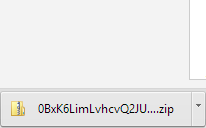
There is another way which is working well https://googledrive.com/host/0BxK6LimLvhcvQ2JUSXQzLXdtUzg but the problem is the downloaded file name is the file id name