Many will facing issue when try to duplicate or clone database table in MySQL.
Below is the script and it's tested working well.
New table: tbltransaction_new
Existing table: tbltransaction
CREATE TABLE tbltransaction_new LIKE tbltransaction;
INSERT tbltransaction_new SELECT * FROM tbltransaction;
Showing posts with label MySQL. Show all posts
Showing posts with label MySQL. Show all posts
Thursday, September 4, 2014


Wednesday, July 25, 2012
MYSQL Error 1053: The service did not respond to the start or control request in a timely fashion
I'm running mysql in windows server 2003 and was running well all the while. Today, my colleague execute some script and cause mysql hang. So, we have decided to restart the server. After restart the server, window service show that mysql in starting status after 20 minutes. So, i have decided to kill the process in task manager and start the service manually.
Then i hit error message "Error 1053: The service did not respond to the start or control request in a timely fashion" and fail to start mysql. I've tried to restart windows server again but it doesn't work. I'm not sure what is the reason. What i decided to do is take out the database my colleague work with previous and try to restart mysql service again. Where is mysql data file store? The location can be found in my.ini file.In my case, my file is stored in "C:\Documents and Settings\All Users\Application Data\MySQL\MySQL Server 5.1". I cut the paste the database out of the folder and restart mysql. It's work!!
Hope this experience can share with friend who hit the similar scenario. For friends who face the same error, maybe this link might helps http://support.microsoft.com/kb/886695
Then i hit error message "Error 1053: The service did not respond to the start or control request in a timely fashion" and fail to start mysql. I've tried to restart windows server again but it doesn't work. I'm not sure what is the reason. What i decided to do is take out the database my colleague work with previous and try to restart mysql service again. Where is mysql data file store? The location can be found in my.ini file.In my case, my file is stored in "C:\Documents and Settings\All Users\Application Data\MySQL\MySQL Server 5.1". I cut the paste the database out of the folder and restart mysql. It's work!!
Hope this experience can share with friend who hit the similar scenario. For friends who face the same error, maybe this link might helps http://support.microsoft.com/kb/886695
Wednesday, May 2, 2012
How to view Mysql Stored Procedure in PhpMyAdmin
How to view Mysql Stored Procedure in PhpMyAdmin?
- In PhpMyAdmin, select the correct Database on the left hand panel
- You can see all the database tables in the right hand panel
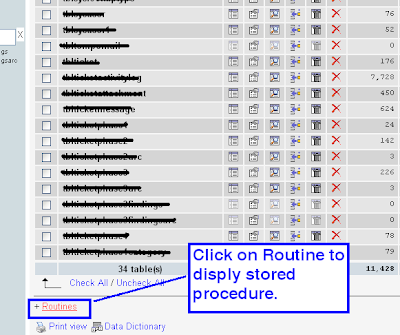
- Scroll down the right hand panel until the end, you will see Routines
- Click on Routines
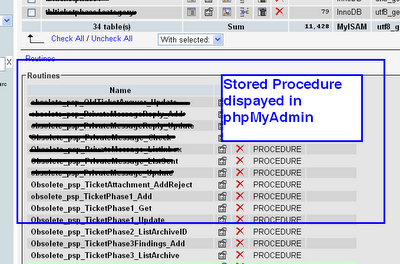
- Once click on Routines, all the Stored Procedure will be displayed on screen


Thursday, February 23, 2012
Mysql very slow for certain schema
I have a database/schema name inventorysoftware and have a .net windows application running on this schema. The issue is, the application run very slow on this schema (like each click need to wait about 30 seconds). I have about 40 others schema running in my development machine with windows XP Pro.
I have tried to google around the issue but can't find any similar problem. One thing i need to mention here is i have about 15 schema with name inventorysoftware_ddmmyy where dd=day, mm=month, yy= year. You know, developer like to keep the backup schema for testing. After the application deployed to customer, i decided to clean my 15 schema with name inventorysoftware_ddmmyy .
After i have deleted the schema, my application move very fast. I found the root cause for the slowness. Lesson learn, don't use the schema starting with the same name. It will kill you.
I have tried to google around the issue but can't find any similar problem. One thing i need to mention here is i have about 15 schema with name inventorysoftware_ddmmyy where dd=day, mm=month, yy= year. You know, developer like to keep the backup schema for testing. After the application deployed to customer, i decided to clean my 15 schema with name inventorysoftware_ddmmyy .
After i have deleted the schema, my application move very fast. I found the root cause for the slowness. Lesson learn, don't use the schema starting with the same name. It will kill you.
Wednesday, November 9, 2011
MYSQL - IF NOT EXISTS ... INSERT INTO
Database MYSQL - tried IF NOT EXISTS ... INSERT INTO but not working.
IF NOT EXISTS (SELECT * FROM tblabc WHERE id = 10547) THEN
INSERT INTO tblabc
(a, b, c)
SELECT a , b, c
FROM tblabc WHERE id = 10547;
END IF;
Finally, this work
INSERT INTO tblabc
(a, b, c)
SELECT a , b, c
FROM tblabc WHERE id = 10547
AND NOT EXISTS (SELECT * FROM tblabc WHERE id = 10547);
IF NOT EXISTS (SELECT * FROM tblabc WHERE id = 10547) THEN
INSERT INTO tblabc
(a, b, c)
SELECT a , b, c
FROM tblabc WHERE id = 10547;
END IF;
Finally, this work
INSERT INTO tblabc
(a, b, c)
SELECT a , b, c
FROM tblabc WHERE id = 10547
AND NOT EXISTS (SELECT * FROM tblabc WHERE id = 10547);
Tuesday, July 19, 2011
MySQL scheduler job / event
In order to have MySQL event run, we need to make sure GLOBAL event_scheduler is set to on or 1.
SET GLOBAL event_scheduler = ON;
Or we can set in my.ini (in windows) or my.cnf (in linux) file with value
event_scheduler=on
Then create a scheduler job in MySQL. Example, i wish to call a stored procedure psp_DailyJob() every day start from 12:25:00.
CREATE EVENT CallDailyJob
ON SCHEDULE EVERY 1 DAY STARTS '2011-07-18 12:45:00'
DO
CALL psp_DailyJob()
SET GLOBAL event_scheduler = ON;
Or we can set in my.ini (in windows) or my.cnf (in linux) file with value
event_scheduler=on
Then create a scheduler job in MySQL. Example, i wish to call a stored procedure psp_DailyJob() every day start from 12:25:00.
CREATE EVENT CallDailyJob
ON SCHEDULE EVERY 1 DAY STARTS '2011-07-18 12:45:00'
DO
CALL psp_DailyJob()
Monday, July 18, 2011
Search text in MySQL stored procedure
Search keyword or text in MySQL stored procedure
SELECT * FROM INFORMATION_SCHEMA.ROUTINES
WHERE ROUTINE_DEFINITION LIKE '%IsConsignment%'
Order by Routine_Name;
SELECT * FROM INFORMATION_SCHEMA.ROUTINES
WHERE ROUTINE_DEFINITION LIKE '%IsConsignment%'
Order by Routine_Name;
Saturday, July 2, 2011
You can't specify target table 'xx' for update in FROM clause
Try to update a column in MySQL which uses SUM and join and hit error "You can't specify target table 'xx' for update in FROM clause "
Which is not working.
Finally, found a solution which is working
UPDATE tblstocktake ap SET TotalQuantity =
(
SELECT SUM(t.Unitinstock)
FROM tblstocktake t
JOIN tblstocktake a
ON a.productid = t.productid
WHERE a.productid = ap.productid
GROUP BY a.productid
);
Which is not working.
Finally, found a solution which is working
UPDATE tblstocktake LEFT JOIN
(SELECT productid,
SUM(unitinstock) AS baseVal
FROM tblstocktake
GROUP BY productid)
AS totalSum USING (productid)
SET totalquantity=baseVal;
Tuesday, April 12, 2011
Data too long for column 'xxxxx' at row 1
Try to update a column showContent which is boolean datatype in tbl_page table in mysql
UPDATE tbl_page SET showContent='1' WHERE pk=13
and hit error message "Data too long for column 'showContent' at row 1"
After try around and figure out below solve my issue
UPDATE tbl_page SET showContent=1 WHERE pk=13
UPDATE tbl_page SET showContent='1' WHERE pk=13
and hit error message "Data too long for column 'showContent' at row 1"
After try around and figure out below solve my issue
UPDATE tbl_page SET showContent=1 WHERE pk=13
Monday, March 21, 2011
Unable to retrieve stored procedure metadata. Either grant SELECT privilege to mysql.proc for this user or use "use procedure bodies=false" with your connection string.
Error receive when trying access to mysql database using windows application.
"Unable to retrieve stored procedure metadata. Either grant SELECTprivilege to mysql.proc for this user or use "use procedure bodies=false" with your connection string."

I'm using user "mrptest" connect to database and user "mrptest" has been granted to all privilage. The stored procedure created using 'root'@'localhost'.
To overcome this problem, i need to to drop all the created database and change the statement from CREATE DEFINER=`root`@`localhost` PROCEDURE to CREATE DEFINER=`mrptest`@`%` PROCEDURE
DELIMITER $$
DROP PROCEDURE IF EXISTS `psp_AAA` $$
CREATE DEFINER=`root`@`localhost` PROCEDURE `psp_AAA`()
BEGIN
END $$
DELIMITER ;
Now i change to
DELIMITER $$
DROP PROCEDURE IF EXISTS `psp_AAA` $$
CREATE DEFINER=`mrptest`@`%` PROCEDURE `psp_AAA`()
BEGIN
END $$
DELIMITER ;
Problem solved.
"Unable to retrieve stored procedure metadata. Either grant SELECTprivilege to mysql.proc for this user or use "use procedure bodies=false" with your connection string."

I'm using user "mrptest" connect to database and user "mrptest" has been granted to all privilage. The stored procedure created using 'root'@'localhost'.
To overcome this problem, i need to to drop all the created database and change the statement from CREATE DEFINER=`root`@`localhost` PROCEDURE to CREATE DEFINER=`mrptest`@`%` PROCEDURE
DELIMITER $$
DROP PROCEDURE IF EXISTS `psp_AAA` $$
CREATE DEFINER=`root`@`localhost` PROCEDURE `psp_AAA`()
BEGIN
END $$
DELIMITER ;
Now i change to
DELIMITER $$
DROP PROCEDURE IF EXISTS `psp_AAA` $$
CREATE DEFINER=`mrptest`@`%` PROCEDURE `psp_AAA`()
BEGIN
END $$
DELIMITER ;
Problem solved.
Monday, November 22, 2010
MySQL Server 5.1 data folder
My development machine have MySQL server 5.0 installed and i upgrade to version 5.1.
After i've installed MySQL server 5.1, i can't found the data folder which normally in "C:\program files\MySQL\MySQL Server 5.0\data" for version 5.0.
Finally able to get the location in in "C:\Users\All Users\MySQL\MySQL Server 5.1\data" for Windows Vista
If you are using windows XP, it's in "C:\Documents and Settings\All Users\MySQL\MySQL Server 5.1\data"
Hope this help
After i've installed MySQL server 5.1, i can't found the data folder which normally in "C:\program files\MySQL\MySQL Server 5.0\data" for version 5.0.
Finally able to get the location in in "C:\Users\All Users\MySQL\MySQL Server 5.1\data" for Windows Vista
If you are using windows XP, it's in "C:\Documents and Settings\All Users\MySQL\MySQL Server 5.1\data"
Hope this help
Sunday, October 17, 2010
MS SQL profiler like for mysql
I was looking around a software for MySQL that can work like MSSQL profiler which can monitor the SQL query executed. Finally i found one called Log Monitor which work well for me.
How it's work? Download Log Monitor. Open LogMonitor.jar file.
Connect to MySQL server, open a SQL Query window and run this script
SET GLOBAL general_log = 'ON';
Now, open another SQL Query window and run any script. You can see the query you run displayed in the Log Monitor.
Hope this help.
How it's work? Download Log Monitor. Open LogMonitor.jar file.
Connect to MySQL server, open a SQL Query window and run this script
SET GLOBAL general_log = 'ON';
Check on log file location in my.ini file (for windows user) or my.cnf (for linux user).
For windows user,
#Path to the database root
datadir="C:/Documents and Settings/All Users/Application Data/MySQL/MySQL Server 5.1/Data/"
Open Log Monitor and set "log file path" with the file name.
Now, open another SQL Query window and run any script. You can see the query you run displayed in the Log Monitor.
Hope this help.
Friday, October 1, 2010
mysql 5.1 data folder / directory / location
I've installed new MySQL 5.1 to replace my MySQL 5.0. I cannot find my data folder.
Finally, check my.ini file in MySQL 5.1 folder and found line below
datadir="C:/Documents and Settings/All Users/Application Data/MySQL/MySQL Server 5.1/Data/"
All data folder is in "C:/Documents and Settings/All Users/Application Data/MySQL/MySQL Server 5.1/Data/"
Finally, check my.ini file in MySQL 5.1 folder and found line below
datadir="C:/Documents and Settings/All Users/Application Data/MySQL/MySQL Server 5.1/Data/"
All data folder is in "C:/Documents and Settings/All Users/Application Data/MySQL/MySQL Server 5.1/Data/"
Thursday, September 3, 2009
The timeout period elapsed prior to obtaining a connection from the pool. This may have occurred because all pooled connections were in use .. pool
Timeout expired. The timeout period elapsed prior to obtaining a connection from the pool.
This may have occurred because all pooled connections were in use and max pool size was reached.
This may have occurred because all pooled connections were in use and max pool size was reached.
My web app written is ASP.NET C# and database use MySQL.
To solve it. Close all your connection each time you have finishing your query.
Monday, August 24, 2009
Sys.WebForms.PageRequestManagerServerErrorException: an unknow error occured while processing the request on the server. ..status code returned .. 500
My situation:
Environment: ASP.NET, AJAX.NET and MySQL DB
I got error return when using one of the form written in AJAX.NET when calling MySQL Stored Procedure
Sys.WebForms.PageRequestManagerServerErrorException: an unknow error occured while processing the request on the server. the status code returned from the server was: 500

Well, after check around i found out that the problem is in the MySQL Stored Procedure case sensitive issue. Change the case and problem solved!
Environment: ASP.NET, AJAX.NET and MySQL DB
I got error return when using one of the form written in AJAX.NET when calling MySQL Stored Procedure
Sys.WebForms.PageRequestManagerServerErrorException: an unknow error occured while processing the request on the server. the status code returned from the server was: 500

Well, after check around i found out that the problem is in the MySQL Stored Procedure case sensitive issue. Change the case and problem solved!
Wednesday, August 19, 2009
phpmyadmin and stored procedure
As far as i know, we are not able to view, edit stored procedure using phpmyadmin but we are able to drop/create stored procedure using phpmyadmin.
Error
SQL query:
DELIMITER;
#1064 - You have an error in your SQL syntax; check the manual that corresponds to your MySQL server version for the right syntax to use near 'DELIMITER' at line 1 my original code:
DELIMITER $$
DROP PROCEDURE IF EXISTS `xxxweb`.`pp_pspbatch` $$
CREATE DEFINER=`root`@`localhost` PROCEDURE `pp_pspbatch`(
IN pBatchName VARCHAR(255),
IN pCountryID INT
)
BEGIN
xxxxx
xxxxx
xxxxx
END $$
DELIMITER ;
try below steps, it help to solve my problem
1. Go to any SQL tab in phpMyAdmin.
2. Directly below the SQL text area you'll see a text input labeled "Delimiter." In that field, enter "$$".
DELIMITER ;
try below steps, it help to solve my problem
1. Go to any SQL tab in phpMyAdmin.
2. Directly below the SQL text area you'll see a text input labeled "Delimiter." In that field, enter "$$".

3. Modify the script become like below
DROP PROCEDURE IF EXISTS `xxxweb`.`pp_pspbatch` $$
CREATE DEFINER=`root`@`localhost` PROCEDURE `pp_pspbatch`(
IN pBatchName VARCHAR(255),
IN pCountryID INT
)
BEGIN
xxxxx
CREATE DEFINER=`root`@`localhost` PROCEDURE `pp_pspbatch`(
IN pBatchName VARCHAR(255),
IN pCountryID INT
)
BEGIN
xxxxx
xxxxx
xxxxx
END $$
and run it. It works.
Monday, July 13, 2009
#1064 - You have an error in your SQL syntax; xxx corresponds to your MySQL server version for the right syntax to use near 'DELIMITER' at line 1
I try to create a mysql stored procedure using phpmyadmin and hit error below
my original code:
DELIMITER $$
DROP PROCEDURE IF EXISTS `xxxweb`.`pp_pspbatch` $$
CREATE DEFINER=`root`@`localhost` PROCEDURE `pp_pspbatch`(
IN pBatchName VARCHAR(255),
IN pCountryID INT
)
BEGIN
xxxxx

3. Modify the script become like below
Error
SQL query:
DELIMITER;
#1064 - You have an error in your SQL syntax; check the manual that corresponds to your MySQL server version for the right syntax to use near 'DELIMITER' at line 1 my original code:
DELIMITER $$
DROP PROCEDURE IF EXISTS `xxxweb`.`pp_pspbatch` $$
CREATE DEFINER=`root`@`localhost` PROCEDURE `pp_pspbatch`(
IN pBatchName VARCHAR(255),
IN pCountryID INT
)
BEGIN
xxxxx
xxxxx
xxxxx
END $$
DELIMITER ;
try below steps, it help to solve my problem
1. Go to any SQL tab in phpMyAdmin.
2. Directly below the SQL text area you'll see a text input labeled "Delimiter." In that field, enter "$$".
DELIMITER ;
try below steps, it help to solve my problem
1. Go to any SQL tab in phpMyAdmin.
2. Directly below the SQL text area you'll see a text input labeled "Delimiter." In that field, enter "$$".
3. Modify the script become like below
DROP PROCEDURE IF EXISTS `xxxweb`.`pp_pspbatch` $$
CREATE DEFINER=`root`@`localhost` PROCEDURE `pp_pspbatch`(
IN pBatchName VARCHAR(255),
IN pCountryID INT
)
BEGIN
xxxxx
CREATE DEFINER=`root`@`localhost` PROCEDURE `pp_pspbatch`(
IN pBatchName VARCHAR(255),
IN pCountryID INT
)
BEGIN
xxxxx
xxxxx
xxxxx
END $$
and run it. It works.
Tuesday, May 19, 2009
MySql.Data.MySqlClient.MySqlException: Table 'xxx.xx_XxxxXxx' doesn't exist
Hit error when try to connect to MySQL in Linux from ASP.NET in IIS6. Seriously, the table is 100% Exist in the database but i hit error below:

Well, finally find out that it caused by case sensitive on the table name. After i've change the name, it's work perfectly.
Description: An unhandled exception occurred during the execution of the current web request. Please review the stack trace for more information about the error and where it originated in the code.
Exception Details: MySql.Data.MySqlClient.MySqlException: Table 'xxx. xx_XxxxXxx' doesn't exist

Well, finally find out that it caused by case sensitive on the table name. After i've change the name, it's work perfectly.
Monday, May 18, 2009
Access denied for user 'xxxx'@'xxx.xxx.xxx.xxx' (using password: YES)
Well, my scenario is connecting my ASP.NET 2.0 apps from IIS6 (window 2003 server) to MySQL (Linux) using ADO.NET Connector.
Hit error message when try to connect:
Access denied for user 'userxxx'@'xxx.xxx.xxx.xxx' (using password: YES)

It's quite worry because this is first time trying to connect from a .net web application is IIS to MySQL in Linux.
Prior to that, privileges must be granted in MySQL.
______________________________________________
mysql> grant all privileges on *.* to 'userxxx'@'xxx.xxx.xxx.xxx'
identified by 'xxxpasswordxxx' with grant option;
Query OK, 0 rows affected (0.00 sec)
______________________________________________
Finally, found that it's my own mistake. I've put in the wrong username and password. Check your username and password seriously before the connection.
Hit error message when try to connect:
Access denied for user 'userxxx'@'xxx.xxx.xxx.xxx' (using password: YES)

It's quite worry because this is first time trying to connect from a .net web application is IIS to MySQL in Linux.
Prior to that, privileges must be granted in MySQL.
______________________________________________
mysql> grant all privileges on *.* to 'userxxx'@'xxx.xxx.xxx.xxx'
identified by 'xxxpasswordxxx' with grant option;
Query OK, 0 rows affected (0.00 sec)
______________________________________________
Finally, found that it's my own mistake. I've put in the wrong username and password. Check your username and password seriously before the connection.
Saturday, May 16, 2009
Add more than one column to a table in MySQL
Sometimes we might need to add multiple column to a table in MySQL, sample below work perfectly
ALTER TABLE pp_batch_detail
ADD `user_id` int(10) unsigned default NULL,
ADD `user_name` varchar(255) default NULL,
ADD `date_request` datetime default NULL;
ALTER TABLE pp_batch_detail
ADD `user_id` int(10) unsigned default NULL,
ADD `user_name` varchar(255) default NULL,
ADD `date_request` datetime default NULL;
Subscribe to:
Posts (Atom)