Pages

Search This Blog

Friday, June 5, 2009

PHP call external cgi and process responses

This is tough for me. First time to code in PHP with cgi and don't know how to start. Thanks google for this.

My task is call a cgi script to execute some function and process the return data. Well, here i'll mention on how to call external cgi and the process part can be settled using PHP string processing.

Let's start by example:

cgi domain location: www.xincube.com/script/handler/api.cgi

The code will strip header below and return the content of the response data.

HTTP/1.1 200 OK
Date: Sat, 06 Jun 2009 02:23:33 GMT
Server: Apache
Proxy-x-forwarded-for: 203.116.10.206
X-returncode: 0
X-returndesc: Access denied
Cache-control: no-cache
Pragma: no-cache
Connection: close
Transfer-Encoding: chunked
Content-Type: text/plain

We can do anything we want to get the information we need in $content.

CODE:

/* sample for calling cgi */
$host = 'www.xincube.com';
$path = '/scripts/handler/API.cgi';

$data_to_send = 'action=GetSupportedData';


PostToHost($host, $path, $data_to_send);

/* function that will call cgi */
function PostToHost($host, $path, $data_to_send) {

$header = "not yet";
$content = '';
$fp = fsockopen($host,80, $errno, $errstr, 30);
if (!$fp) {
echo "$errstr ($errno)\n";
}
else {
fputs($fp, "POST $path HTTP/1.1\n");
fputs($fp, "Host: $host\n");
fputs($fp, "Content-type: application/x-www-form-urlencoded\n");
fputs($fp, "Content-length: ".strlen($data_to_send)."\n");
fputs($fp, "Connection: close\n\n");
fputs($fp, $data_to_send);

while(!feof($fp)) {
//echo fgets($fp, 4000);
$line = fgets( $fp, 4000 );
if( $line == "\r\n" && $header == "not yet" ) {
$header = "passed";
}
if( $header == "passed" ) {
$content .= $line;
}
}
echo $content;
fclose($fp);
}
}


Hope this help. Support me to write more by clicking on the ads sponsor or donation. Thanks

Tuesday, May 19, 2009

MySql.Data.MySqlClient.MySqlException: Table 'xxx.xx_XxxxXxx' doesn't exist

Hit error when try to connect to MySQL in Linux from ASP.NET in IIS6. Seriously, the table is 100% Exist in the database but i hit error below:

Description: An unhandled exception occurred during the execution of the current web request. Please review the stack trace for more information about the error and where it originated in the code. 

Exception Details: MySql.Data.MySqlClient.MySqlException: Table 'xxx. xx_XxxxXxx' doesn't exist


Well, finally find out that it caused by case sensitive on the table name. After i've change the name, it's work perfectly.


Monday, May 18, 2009

Access denied for user 'xxxx'@'xxx.xxx.xxx.xxx' (using password: YES)

Well, my scenario is connecting my ASP.NET 2.0 apps from IIS6 (window 2003 server) to MySQL (Linux) using ADO.NET Connector.

Hit error message when try to connect:
Access denied for user 'userxxx'@'xxx.xxx.xxx.xxx' (using password: YES)


It's quite worry because this is first time trying to connect from a .net web application is IIS to MySQL in Linux.

Prior to that, privileges must be granted in MySQL.
______________________________________________
mysql> grant all privileges on *.* to 'userxxx'@'xxx.xxx.xxx.xxx'
identified by 'xxxpasswordxxx' with grant option;
Query OK, 0 rows affected (0.00 sec)
______________________________________________

Finally, found that it's my own mistake. I've put in the wrong username and password. Check your username and password seriously before the connection.

Saturday, May 16, 2009

Add more than one column to a table in MySQL

Sometimes we might need to add multiple column to a table in MySQL, sample below work perfectly

ALTER TABLE pp_batch_detail
ADD `user_id` int(10) unsigned default NULL,
ADD `user_name` varchar(255) default NULL,
ADD `date_request` datetime default NULL;

Friday, March 27, 2009

Earth Hour


I'm in.  Are you?

Believe it,  it's simple. Switch off your light at local time 8:30pm on Saturday 28 March wherever you are in every corner of the world. Bring awareness to people around us on how much we love our earth.

Friday, March 13, 2009

Resize Image in Crystal Report 9 Visual Studio 2005

Well, many may think or looking for resize image in Crystal Report 9. Here is some hints and code that may help. Hopefully you can understand after go thru simple sample code.

1 pixel should be equal to 15 twips in Crystal Report.

int LogoWidth = 100;

      int LogoHeight = 80;

reportdocument.Load("abc.rpt");

reportdocument.SetDataSource(myDataTable);

reportdocument.Section2.ReportObjects["LogoImage1"].Width = LogoWidth * 15;

reportdocument.Section2.ReportObjects["LogoImage1"].Height = LogoHeight * 15;

CrystalReportViewer.ReportSource = reportdocument;

Sunday, March 1, 2009

JFolder::folder: Path is not a folder - AllVideos Reloaded in Joomla

In my local development machine, facing error after install AllVideos Reloaded in Joomla! 1.5.9

JFolder::folder: Path is not a folder
JFolder::files: Path is not a folder

suspect is folder missing when AllVideos check on the playlist. The problem solve when i add a new folder manually to the folder videos to the playlist pointed folder. 

In my case, C:\xampp\htdocs\Joomla\images\stories\videos 

Hope this help you.

ps: it actually stated very clear that we need to create folder audio and videos in images/stories folder after the installation of AllVideos. It just that i didnt noticed. 


Sunday, February 15, 2009

Develop application using SQL Compact 3.5 SP1 with Visual Studio 2005

Can MS SQL Compact 3.5 SP1 work together with VS 2005? The answer is yes.

We are using Visual Studio 2005 (C#) and wish to create a window desktop application. After some consideration, the decision is for for MS SQL Compact 3.5 SP1. 

To enable me to work on MS SQL Compact 3.5 SP1:
  • Install MS SQL Compact 3.5 SP1 
  • Install MS SQL 2008 Express - to get SQL Server Management Studio to work with SQL Compact for table creation and scripting.
  • Add MS SQL Compact 3.5 SP1 engine to VS 2005 project
  • Connect to MS SQL Compact 3.5 SP1 engine in VS 2005 (C#) project

Install MS SQL Compact 3.5 SP1


The installation is easy and straightforward. I assume there will be no problem facing here.


Install MS SQL 2008 Express - to get SQL Server Management Studio to work with SQL Compact for table creation and scripting

In order to install MS SQL 2008 Express, you need to have below installed prio to that
  • Microsoft .NET Framework 3.5 Service Pack 1
  • Windows Installer 4.5
  • Windows PowerShell 1.0

After finish installation, you can connect to the MS SQL Compact 3.5 SP1 using SSMS. Open SSMS, choose Server type: "SQL Server Compact Edition" as shown below.


After that you can choose to create a new MS SQL Compact database or use the existing one as shown below:


After the connection, you can create table and etc. 

p/s: if you hit error "'' is not a valid login or you do not have permission" during installation, please refer to my previous post.


Add MS SQL Compact 3.5 SP1 engine to VS 2005 project

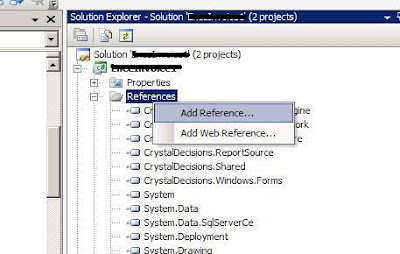
Open the project for the application, right click on Reference.


Browse on SQL Server Compact 3.5 sp1 engine (System.Data.SqlServerCe.dll) and add as reference. 

My location is in "C:\Program Files\Microsoft SQL Server Compact Edition\v3.5\Desktop\System.Data.SqlServerCe.dll"

Connect to MS SQL Compact 3.5 SP1 engine in VS 2005 (C#) project

remember to add reference to your C# code

using System.Data;
using System.Data.SqlServerCe;  // <-- Add this

SqlCeConnection _connection;

string fileName = "mycompactDB.sdf";
           string password = "AbCd1@3$5^7*";

           string connectionString = string.Format(
               "DataSource=\"{0}\"; Password='{1}'", fileName, password);

           _connection = new SqlCeConnection(connectionString);
           _connection.Open();

DONE! Hope this can help.

For other reading, can refer to 

SQL Server Compact 3.5
http://technet.microsoft.com/en-us/sqlserver/bb671088.aspx

SQL Server Compact 3.5 How-to Tutorials
http://msdn.microsoft.com/en-us/sqlserver/bb895908.aspx 


SQLCE 3.5 Database Tutorial
http://dotnetperls.com/Content/SQLCE-Database-Use.aspx

Dynamic Image in Crystal Report 9 Visual Studio 2005 - C#

I found many developers facing the same problem as i do - dynamic include image to crystal report with Visual Studio 2005 . This is how we solve our problem in C# when developing a desktop window application.

  1. In your xsd, create a colomn that does not exist in your dataset, example, [LogoImage], and set the datatype to “System.Byte[]”. You might find the datatype option only have “System.Byte”, you can manually type in “[]”.
  2. Add the following code in your form.

    private void AddImageColumn(DataTable objDataTable, string strFieldName)
    {
    try
    {
    DataColumn objDataColumn = new DataColumn(strFieldName,
    Type.GetType("System.Byte[]"));
    objDataTable.Columns.Add(objDataColumn);
    }
    catch (Exception ex)
    {
    //handler
    }
    }

    private void LoadImage(DataRow objDataRow, string strImageField, string FilePath)
    {
    try
    {
    FileStream fs = new FileStream(FilePath, System.IO.FileMode.Open,
    System.IO.FileAccess.Read);
    byte[] Image = new byte[fs.Length];
    fs.Read(Image, 0, Convert.ToInt32(fs.Length));
    fs.Close();
    objDataRow[strImageField] = Image;
    }
    catch (Exception ex)
    {
    //Handler
    }
    }

  3. After your getting your dataset from database and before bind to the report view, do this.

    AddImageColumn(myDataTable, "LogoImage");

    for (int index = 0; index < myDataTable.Rows.Count; index++)
    {
    if (myDataTable.Rows[index]["LogoLocation"].ToString() != "")
    {
    if(File.Exists(myDataTable.Rows[index]["LogoLocation"].ToString()))
    {
    LoadImage(myDataTable.Rows[index], "LogoImage",
    myDataTable.Rows[index]["LogoLocation"].ToString());
    }
    else
    {
    LoadImage(myDataTable.Rows[index], "LogoImage",
    "C:\\NoImage.jpg");
    }
    }
    else
    {
    LoadImage(myDataTable.Rows[index], "LogoImage", "C:\\NoImage.jpg");
    }
    }

  4. Then in your Crystal Report, just drag this column into the report.

Hope this solve your problem.

Monday, February 9, 2009

Installation SQL 2008 Express Error: '' is not a valid login or you do not have permission

This is a very strange error. I've received error message "'' is not a valid login or you do not have permission" when trying to install Microsoft SQL Server 2008 Express Edition in my Microsoft XP Pro SP3 Machine.

To know more on installation guide, please check Install and Configure SQL Server 2008 Express by CondorMan.

I've followed the steps and got error message "'' is not a valid login or you do not have permission." and print screen as below.


I have no idea why is this. I've tried few suggestion stated in some of the forum:


  1. I've tried to change my user name and try to install.
  2. Create a new user "sa" with strong password. Login to window using this account and do installation.
Both methods fail.

Finally, i try to rename my machine/computer name and try to install and the installation completed successfully.


Conclusion:
This may be a bug from microsoft but i'm not sure.

My scenario: computer name = my user account

My Solution: change computer name to != user account then do installation.

p/s: Change user account won't help.

Hope this can help you. Share your solution if you have different one.