Thursday, July 24, 2008
'HTTP 405 - Resource Not Allowed' in asp
This summary is not available. Please
click here to view the post.


Wednesday, July 9, 2008
Javascript: Shorten for if/else
Sometime our code will looks messy if containing too many if/else. We can shorten the code and make it more tidy. Check the code below:
<html>
<head>
<script language="JavaScript">
function foo()
{
var myGender = "female";
alert((myGender == "male") ? "i am male" : "I am female");
}
</script>
</head>
<body onload="javascript:foo();">
</body>
</html>
<html>
<head>
<script language="JavaScript">
function foo()
{
var myGender = "female";
alert((myGender == "male") ? "i am male" : "I am female");
}
</script>
</head>
<body onload="javascript:foo();">
</body>
</html>
Monday, July 7, 2008
Retrieve data from DataTable
I have a DataTable that containing set of data. To get only column name "score" from the DataTable called MyDataTable. Below is how i do
for (int i = 0; i < MyDataTable.Rows.Count; i++)
for (int i = 0; i < MyDataTable.Rows.Count; i++)
{
string score = MyDataTable.Rows[i]["score"].ToString();
xxxxxx
xxxxxx
}
Thursday, July 3, 2008
W3SVC Restart when changing ASP.NET version in ASP.NET tab (IIS)
I'm not sure what is happening but i suspect that i change the ASP.NET version in IIS cause W3SVC restart. All application in the same application pool working ok and restart successfully but other application pull have some issue.
If anyone face the same or similar issue, maybe can share your solution.
If anyone face the same or similar issue, maybe can share your solution.
Zip & FTP database for backup purposes
My situation:
i need to backup, zip and FTP my database to another server for safety purposes.
My MSSQL database run a daily backup job at 12:00AM to backup folder (E:\Program Files\Microsoft SQL Server\MSSQL.1\MSSQL\Backup\) with name: MyDB_backup_200806010000.bak
where 2008 = YYYY, 06 = MM, 01 = DD and 0000 is fixed
my part is zip MyDB_backup_200806010000.bak to MyDB_backup_200806010000.zip and FTP to folder myapp/db in the remote site.
Software: 7zip, core ftp LE (both are free), both can be downloaded free only, google it online and you can get the file downloaded.
Steps:
1. Install Core Ftp LE in the server (my installation folder: c:"\program files\coreftp\coreftp.exe")
2. Open Core Ftp LE and create my FTP site and enter FTP username and password. I name my site mybacksite.
3. Install 7zip in the server. Copy 7z.exe from the installation folder (mine is in C:\Program Files\7-Zip\7z.exe) to database backup folder (mine is in E:\Program Files\Microsoft SQL Server\MSSQL.1\MSSQL\Backup\).
4. Write a windows batch script (batch) to perform the zip and ftp process. I name it appDBbackup.bat and put it in (mine is in E:\Program Files\Microsoft SQL Server\MSSQL.1\MSSQL\Backup\)
appDBbackup.bat:
@echo Off
for /f "tokens=1,2" %%u in ('date /t') do set d=%%v
for /f "tokens=1" %%u in ('time /t') do set t=%%u
if "%t:~1,1%"==":" set t=0%t%
rem set timestr=%d:~6,4%%d:~3,2%%d:~0,2%%t:~0,2%%t:~3,2%
set datestr=%d:~6,4%%d:~0,2%%d:~3,2%
set timestr=%t:~0,2%%t:~3,2%
7z a -tzip MyDB_backup_%datestr00.zip MyDB_backup_%datestr00.bak
setlocal
c:"\program files\coreftp\coreftp.exe" -s -O -u "E:\Program Files\Microsoft SQL Server\MSSQL.1\MSSQL\Backup\MyDB_backup_%datestr00.zip" -site mybacksite -p /myapp/db/
5. Create a windows scheduler to run the job. Point the task to appDBbackup.bat. In my case, i point to E:\Program Files\Microsoft SQL Server\MSSQL.1\MSSQL\Backup\appDBbackup.bat and i schedule it at 12:30AM, 30 minutes after the backup started.
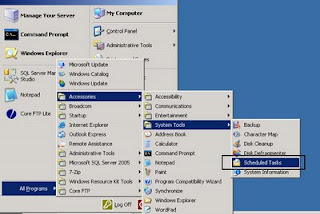
to know more on how to create windows scheduler. read this
Done.
i need to backup, zip and FTP my database to another server for safety purposes.
My MSSQL database run a daily backup job at 12:00AM to backup folder (E:\Program Files\Microsoft SQL Server\MSSQL.1\MSSQL\Backup\) with name: MyDB_backup_200806010000.bak
where 2008 = YYYY, 06 = MM, 01 = DD and 0000 is fixed
my part is zip MyDB_backup_200806010000.bak to MyDB_backup_200806010000.zip and FTP to folder myapp/db in the remote site.
Software: 7zip, core ftp LE (both are free), both can be downloaded free only, google it online and you can get the file downloaded.
Steps:
1. Install Core Ftp LE in the server (my installation folder: c:"\program files\coreftp\coreftp.exe")
2. Open Core Ftp LE and create my FTP site and enter FTP username and password. I name my site mybacksite.
3. Install 7zip in the server. Copy 7z.exe from the installation folder (mine is in C:\Program Files\7-Zip\7z.exe) to database backup folder (mine is in E:\Program Files\Microsoft SQL Server\MSSQL.1\MSSQL\Backup\).
4. Write a windows batch script (batch) to perform the zip and ftp process. I name it appDBbackup.bat and put it in (mine is in E:\Program Files\Microsoft SQL Server\MSSQL.1\MSSQL\Backup\)
appDBbackup.bat:
@echo Off
for /f "tokens=1,2" %%u in ('date /t') do set d=%%v
for /f "tokens=1" %%u in ('time /t') do set t=%%u
if "%t:~1,1%"==":" set t=0%t%
rem set timestr=%d:~6,4%%d:~3,2%%d:~0,2%%t:~0,2%%t:~3,2%
set datestr=%d:~6,4%%d:~0,2%%d:~3,2%
set timestr=%t:~0,2%%t:~3,2%
7z a -tzip MyDB_backup_%datestr00.zip MyDB_backup_%datestr00.bak
setlocal
c:"\program files\coreftp\coreftp.exe" -s -O -u "E:\Program Files\Microsoft SQL Server\MSSQL.1\MSSQL\Backup\MyDB_backup_%datestr00.zip" -site mybacksite -p /myapp/db/
5. Create a windows scheduler to run the job. Point the task to appDBbackup.bat. In my case, i point to E:\Program Files\Microsoft SQL Server\MSSQL.1\MSSQL\Backup\appDBbackup.bat and i schedule it at 12:30AM, 30 minutes after the backup started.

to know more on how to create windows scheduler. read this
Done.
Monday, June 30, 2008
C# String.Format - Input string was not in a correct format Error
Error message: Input string was not in a correct format Error when i try to use String.Format in C#.
below are the code that have problem
info = string.Format("{\"name\":\"{0}\",\"img\":\"{1}\",\"href\":\"{2}\"}", Username, PhotoUrl, UserId);
try to figure out here and there and finally found the problem and solution. It's caused by both { and }.
To solve this problem, change { to {{ and } to }}. It will become
info = string.Format("{{\"name\":\"{0}\",\"img\":\"{1}\",\"href\":\"{2}\"}}", Username, PhotoUrl, UserId);
problem solved!
below are the code that have problem
info = string.Format("{\"name\":\"{0}\",\"img\":\"{1}\",\"href\":\"{2}\"}", Username, PhotoUrl, UserId);
try to figure out here and there and finally found the problem and solution. It's caused by both { and }.
To solve this problem, change { to {{ and } to }}. It will become
info = string.Format("{{\"name\":\"{0}\",\"img\":\"{1}\",\"href\":\"{2}\"}}", Username, PhotoUrl, UserId);
problem solved!
Friday, June 27, 2008
JQuery document ready
If you want to fire an event after the document ready using jquery, you can call function inside $(document).ready(function()){// put all jQuery function here}); or $(function() {// put all jQuery function here.});
You can use
You can use
- $(document).ready(function() {
- // put all jQuery code in here.
- });
- $(function() {
- // put all jQuery code in here.
- });
Thursday, June 19, 2008
Google Toolbar for Firefox 3
Google have release Google Toolbar for firefox 3, the Toolbar can be downloaded from http://www.google.com/tools/firefox/toolbar/FT3/intl/en/index.html


Saturday, June 14, 2008
Google adsense in between blog in blogger (blogspot)
Below picture show adsense display in between blog. How to create absense in between blog in blogger?

steps:

Search the word "post-footer-line post-footer-line-3"
put you adsense before the tag
<div class='post-footer-line post-footer-line-3'/>
example:
..................................................
.................................................
<div>
<script type='text/javascript'>
google_ad_client = "pub-3954566333638548";
google_ad_width = 468;
google_ad_height = 15;
google_ad_format = "468x15_0ads_al";
//2007-10-13: dotnetfish.blogspot.com
google_ad_channel = "8291285977";
google_color_border = "FFFFFF";
google_color_bg = "FFFFFF";
google_color_link = "0066CC";
google_color_text = "000000";
google_color_url = "0066CC";
</script>
<script src='http://pagead2.googlesyndication.com/pagead/show_ads.js' type='text/javascript'>
</script>
</div>
<div class='post-footer-line post-footer-line-3'/>
......................................
......................................
Done

steps:
- Login into blogger,
- Click on Layout
- Click on Edit HTML
- Click on Expand Widget Templates

Search the word "post-footer-line post-footer-line-3"
put you adsense before the tag
<div class='post-footer-line post-footer-line-3'/>
example:
..................................................
.................................................
<div>
<script type='text/javascript'>
google_ad_client = "pub-3954566333638548";
google_ad_width = 468;
google_ad_height = 15;
google_ad_format = "468x15_0ads_al";
//2007-10-13: dotnetfish.blogspot.com
google_ad_channel = "8291285977";
google_color_border = "FFFFFF";
google_color_bg = "FFFFFF";
google_color_link = "0066CC";
google_color_text = "000000";
google_color_url = "0066CC";
</script>
<script src='http://pagead2.googlesyndication.com/pagead/show_ads.js' type='text/javascript'>
</script>
</div>
<div class='post-footer-line post-footer-line-3'/>
......................................
......................................
Done
Microsoft Surface SDK
Microsoft Surface team have not official release public Surface SDK but there is demo in action.
Understand from surface team that there will be two layers, that are Core & WPF. The Core layer supports any .NET UI framework. The WPF layer provides the same functionality as the Core layer and also highly consistent with WPF’s model for input & controls.
Subscribe to:
Posts (Atom)