Sunday, August 17, 2008


TextArea Newline
Even wonder how to construct a new in TextArea? Many try to use <BR>
and /n but both doestn't work for me. But this work for me. Forget to mention, i'm using IE7 when do the testing. I'm not sure whether this is browser dependent.
and /n but both doestn't work for me. But this work for me. Forget to mention, i'm using IE7 when do the testing. I'm not sure whether this is browser dependent.
Tuesday, August 12, 2008
ASP.NET: colon in querystring cause error "is not a valid virtual path."
Server Error in '/' Application.
'~/Search.aspx?pageidx=1&Id=:' is not a valid virtual path.
Description: An unhandled exception occurred during the execution of the current web request. Please review the stack trace for more information about the error and where it originated in the code.
Exception Details: System.Web.HttpException: '~/Search.aspx?pageidx=1&Id=:' is not a valid virtual path.
Understand that in asp.net, virtual path in the URL with colon (:) is not allowed. To solve this problem, i replace the colon (:) with ASCII value for colon : (please check http://www.asciitable.com/) and HttpUtility.UrlEncode on the search key before pass into search.aspx as querystring.
In Search.aspx.cs, do HttpUtility.UrlDecode and pass to DB for searching purposes. Problem solve. Bear in mind that you might need to disable the ValidateRequest (ValidateRequest="false") which may open for dangerous hijack/request.
'~/Search.aspx?pageidx=1&Id=:' is not a valid virtual path.
Description: An unhandled exception occurred during the execution of the current web request. Please review the stack trace for more information about the error and where it originated in the code.
Exception Details: System.Web.HttpException: '~/Search.aspx?pageidx=1&Id=:' is not a valid virtual path.
Understand that in asp.net, virtual path in the URL with colon (:) is not allowed. To solve this problem, i replace the colon (:) with ASCII value for colon : (please check http://www.asciitable.com/) and HttpUtility.UrlEncode on the search key before pass into search.aspx as querystring.
In Search.aspx.cs, do HttpUtility.UrlDecode and pass to DB for searching purposes. Problem solve. Bear in mind that you might need to disable the ValidateRequest (ValidateRequest="false") which may open for dangerous hijack/request.
Monday, August 11, 2008
Databinding methods such as Eval(), XPath(), and Bind() can only be used in the context of a databound control.
Server Error in '/xxxxx' Application.
Databinding methods such as Eval(), XPath(), and Bind() can only be used in the context of a databound control.
Description: An unhandled exception occurred during the execution of the current web request. Please review the stack trace for more information about the
error and where it originated in the code.
Exception Details: System.InvalidOperationException: Databinding methods such as Eval(), XPath(), and Bind() can only be used in the context of a databound control.
Source Error:Line 89: <%# if (Eval("UserId").ToString().Length != 0) {%>
googling around and not able to find a solution. What i do is i put the if/else condition into a function and pass in UserId as parameter and output the desire output string.
now my line 89: become <%# FormatRatedDisplay(Eval("UserId").ToString())%> and new function FormatRatedDisplay will return a string. I issue solved.
Thursday, August 7, 2008
Microsoft .Net Framework TPM - Virus
My antivirus detect a new virus and some file has been deleted but there is a pop up windows keep on showing up and say that "procedure not found". After check around, i found something strange in windows services
Service name: bjvhrz
Display name: bjvhrz
Description: Microsoft .NET Framework TPM
Path to executable: C:\WINDOWS\system32\svchost.exe -k bjvhrz
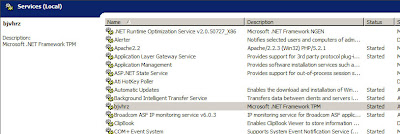
I'm not able to stop and to disabled it.
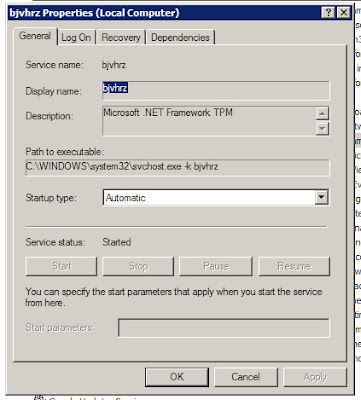
To solve it,
Service name: bjvhrz
Display name: bjvhrz
Description: Microsoft .NET Framework TPM
Path to executable: C:\WINDOWS\system32\svchost.exe -k bjvhrz

I'm not able to stop and to disabled it.

To solve it,
- Disable System Restore
- Back up registry
- Restart in Safe Mode
- Open Registry Editor. Click Start>Run, type REGEDIT, then press Enter.
- In the left panel, double-click the following:
HKEY_LOCAL_MACHINE>SYSTEM>CurrentControlSet>Services - Still in the left panel, locate and delete the key:
bjvhrz - Close Registry Editor.
Thursday, July 24, 2008
'HTTP 405 - Resource Not Allowed' in asp
This summary is not available. Please
click here to view the post.
Wednesday, July 9, 2008
Javascript: Shorten for if/else
Sometime our code will looks messy if containing too many if/else. We can shorten the code and make it more tidy. Check the code below:
<html>
<head>
<script language="JavaScript">
function foo()
{
var myGender = "female";
alert((myGender == "male") ? "i am male" : "I am female");
}
</script>
</head>
<body onload="javascript:foo();">
</body>
</html>
<html>
<head>
<script language="JavaScript">
function foo()
{
var myGender = "female";
alert((myGender == "male") ? "i am male" : "I am female");
}
</script>
</head>
<body onload="javascript:foo();">
</body>
</html>
Monday, July 7, 2008
Retrieve data from DataTable
I have a DataTable that containing set of data. To get only column name "score" from the DataTable called MyDataTable. Below is how i do
for (int i = 0; i < MyDataTable.Rows.Count; i++)
for (int i = 0; i < MyDataTable.Rows.Count; i++)
{
string score = MyDataTable.Rows[i]["score"].ToString();
xxxxxx
xxxxxx
}
Thursday, July 3, 2008
W3SVC Restart when changing ASP.NET version in ASP.NET tab (IIS)
I'm not sure what is happening but i suspect that i change the ASP.NET version in IIS cause W3SVC restart. All application in the same application pool working ok and restart successfully but other application pull have some issue.
If anyone face the same or similar issue, maybe can share your solution.
If anyone face the same or similar issue, maybe can share your solution.
Zip & FTP database for backup purposes
My situation:
i need to backup, zip and FTP my database to another server for safety purposes.
My MSSQL database run a daily backup job at 12:00AM to backup folder (E:\Program Files\Microsoft SQL Server\MSSQL.1\MSSQL\Backup\) with name: MyDB_backup_200806010000.bak
where 2008 = YYYY, 06 = MM, 01 = DD and 0000 is fixed
my part is zip MyDB_backup_200806010000.bak to MyDB_backup_200806010000.zip and FTP to folder myapp/db in the remote site.
Software: 7zip, core ftp LE (both are free), both can be downloaded free only, google it online and you can get the file downloaded.
Steps:
1. Install Core Ftp LE in the server (my installation folder: c:"\program files\coreftp\coreftp.exe")
2. Open Core Ftp LE and create my FTP site and enter FTP username and password. I name my site mybacksite.
3. Install 7zip in the server. Copy 7z.exe from the installation folder (mine is in C:\Program Files\7-Zip\7z.exe) to database backup folder (mine is in E:\Program Files\Microsoft SQL Server\MSSQL.1\MSSQL\Backup\).
4. Write a windows batch script (batch) to perform the zip and ftp process. I name it appDBbackup.bat and put it in (mine is in E:\Program Files\Microsoft SQL Server\MSSQL.1\MSSQL\Backup\)
appDBbackup.bat:
@echo Off
for /f "tokens=1,2" %%u in ('date /t') do set d=%%v
for /f "tokens=1" %%u in ('time /t') do set t=%%u
if "%t:~1,1%"==":" set t=0%t%
rem set timestr=%d:~6,4%%d:~3,2%%d:~0,2%%t:~0,2%%t:~3,2%
set datestr=%d:~6,4%%d:~0,2%%d:~3,2%
set timestr=%t:~0,2%%t:~3,2%
7z a -tzip MyDB_backup_%datestr00.zip MyDB_backup_%datestr00.bak
setlocal
c:"\program files\coreftp\coreftp.exe" -s -O -u "E:\Program Files\Microsoft SQL Server\MSSQL.1\MSSQL\Backup\MyDB_backup_%datestr00.zip" -site mybacksite -p /myapp/db/
5. Create a windows scheduler to run the job. Point the task to appDBbackup.bat. In my case, i point to E:\Program Files\Microsoft SQL Server\MSSQL.1\MSSQL\Backup\appDBbackup.bat and i schedule it at 12:30AM, 30 minutes after the backup started.
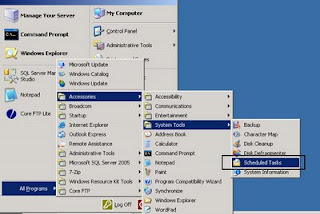
to know more on how to create windows scheduler. read this
Done.
i need to backup, zip and FTP my database to another server for safety purposes.
My MSSQL database run a daily backup job at 12:00AM to backup folder (E:\Program Files\Microsoft SQL Server\MSSQL.1\MSSQL\Backup\) with name: MyDB_backup_200806010000.bak
where 2008 = YYYY, 06 = MM, 01 = DD and 0000 is fixed
my part is zip MyDB_backup_200806010000.bak to MyDB_backup_200806010000.zip and FTP to folder myapp/db in the remote site.
Software: 7zip, core ftp LE (both are free), both can be downloaded free only, google it online and you can get the file downloaded.
Steps:
1. Install Core Ftp LE in the server (my installation folder: c:"\program files\coreftp\coreftp.exe")
2. Open Core Ftp LE and create my FTP site and enter FTP username and password. I name my site mybacksite.
3. Install 7zip in the server. Copy 7z.exe from the installation folder (mine is in C:\Program Files\7-Zip\7z.exe) to database backup folder (mine is in E:\Program Files\Microsoft SQL Server\MSSQL.1\MSSQL\Backup\).
4. Write a windows batch script (batch) to perform the zip and ftp process. I name it appDBbackup.bat and put it in (mine is in E:\Program Files\Microsoft SQL Server\MSSQL.1\MSSQL\Backup\)
appDBbackup.bat:
@echo Off
for /f "tokens=1,2" %%u in ('date /t') do set d=%%v
for /f "tokens=1" %%u in ('time /t') do set t=%%u
if "%t:~1,1%"==":" set t=0%t%
rem set timestr=%d:~6,4%%d:~3,2%%d:~0,2%%t:~0,2%%t:~3,2%
set datestr=%d:~6,4%%d:~0,2%%d:~3,2%
set timestr=%t:~0,2%%t:~3,2%
7z a -tzip MyDB_backup_%datestr00.zip MyDB_backup_%datestr00.bak
setlocal
c:"\program files\coreftp\coreftp.exe" -s -O -u "E:\Program Files\Microsoft SQL Server\MSSQL.1\MSSQL\Backup\MyDB_backup_%datestr00.zip" -site mybacksite -p /myapp/db/
5. Create a windows scheduler to run the job. Point the task to appDBbackup.bat. In my case, i point to E:\Program Files\Microsoft SQL Server\MSSQL.1\MSSQL\Backup\appDBbackup.bat and i schedule it at 12:30AM, 30 minutes after the backup started.

to know more on how to create windows scheduler. read this
Done.
Subscribe to:
Posts (Atom)